By 苏剑林 | March 06, 2016
Recently, I acquired an extremely mini router—built from a 25 x 25mm VoCore development board. With its casing, it measures only 37.4 x 34 x 25.9mm, which is just slightly larger than a typical portable WiFi dongle. (Link)
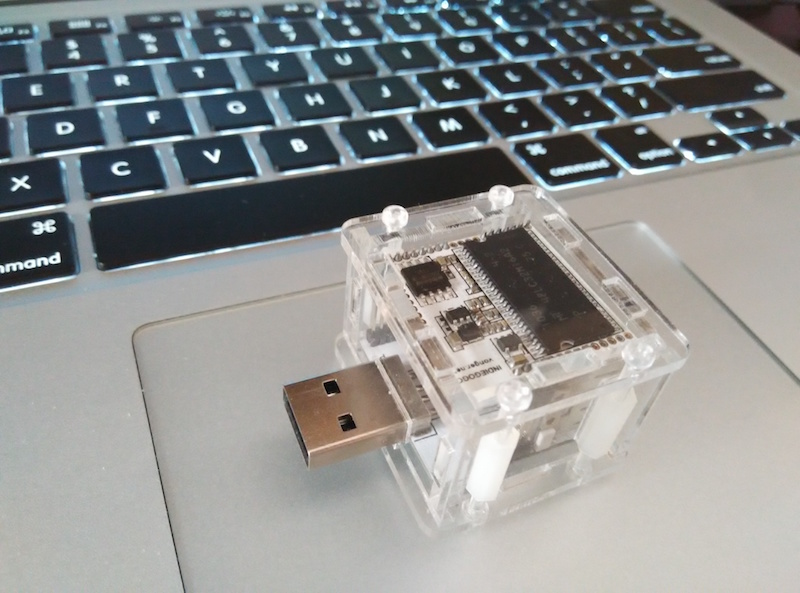
VoCore Router
Despite its small size, its specifications are quite decent:
CPU Processor: Ralink RT5350 360MHz MIPS 24KEc
Memory: 32MB 133MHz SDRAM
Flash: 16MB
Expansion Interfaces: SPI, I2C, I2S
WiFi Wireless: 802.11n
Ethernet Network: 10/100MHz x 2
GPIO Expansion: 28 (Reused)
UART Interfaces: UART Lite / UART Full
USB Interface: USB 2.0, up to 480M
Power Supply: 3.3V ~ 6V
Simply put, it allows us to install OpenWrt, which opens up a lot of possibilities. Because it is so small and portable, it is perfect for use as a travel router. Let's get to work.
As everyone knows, phones or laptops have a feature where if we have connected to several WiFi networks in different places, the device remembers that information. When we return to one of those locations, it automatically connects to the respective WiFi without manual intervention (except for those requiring web authentication). So, can OpenWrt achieve this? In other words, can OpenWrt automatically scan for WiFi, connect to it, and then broadcast its own hotspot for a phone or laptop to use?
One might wonder: if the router can scan the WiFi, then the phone/laptop surely can too, so why bother relaying it? Why not just connect the phone directly? For normal WiFi, that's true, but for networks like our campus WiFi or CMCC, they require authentication and often enforce a "one account, one device" rule. In such cases, a common solution is to use one computer to connect to the WiFi and then use something like a portable USB WiFi dongle to share it. While simple, it's quite ordinary, and I don't always carry a laptop with me. Therefore, that method is not for me.
Enough talk, time to work. My mini router is flashed with OpenWrt 15.05. First, here is the complete process for repeating a standard WiFi (a "standard" WiFi refers to one where you simply enter a password to get online). Directly SSH into the router and enter:
These steps are configured during the first run. Once configured, if you want to change the WiFi being repeated, you only need to modify the repeater section; everything else remains unchanged. Next, let's complete our goal step-by-step. The first step is scanning the WiFi list. In OpenWrt, we use:
This will return a very detailed list of nearby available WiFi networks, including SSID, signal strength, etc. To ensure the stability of the relay, we also need to determine the signal strength of the relay source. For this process, the basic tool used is regex.
Next is implementing automatic authentication. Here, I am only doing the automatic authentication for the SCNU (South China Normal University) campus WiFi. By analyzing its process, I found that it simply POSTs the username and password, so it's quite simple. But what tool should be used to POST? Naturally, I thought of Python's requests, but installing Python and then installing requests is a bit of a hassle. Later, I realized that wget also supports posting data (amazing!). We can just use wget to finish it. However, the built-in wget does not support HTTPS, so you need to use:
to install the full version of wget. With that, we can write a shell script:
The process implemented by this script is: Scan the WiFi list to see if "BoJone" is in the list and check its signal strength. If it's good enough, connect to it automatically. If not, check if "SCNUNET" is available and check its signal strength. If it's good enough, connect to it automatically and complete the authentication. The authentication process is pre-analyzed and written into the POST_SCNUNET function (this function first uses wget to download this website to check if the network is normal; if it is, no authentication is needed; otherwise, it will automatically redirect to the authentication page). If neither is available, it won't repeat any wireless signal and will instead wait for a wired connection.
Other campus WiFi or authenticated WiFi networks are likely similar; this serves only as a reference example.
Finally, I feel that for implementing simple functions, using pure shell scripts is quite refreshing, especially in low-end environments like routers. Naturally, if you can use shell, use shell. With a foundation in Python programming, implementing this was not very difficult.